On my homepage, I have a preview of my blog posts and a button that when clicked displays an extra entry.
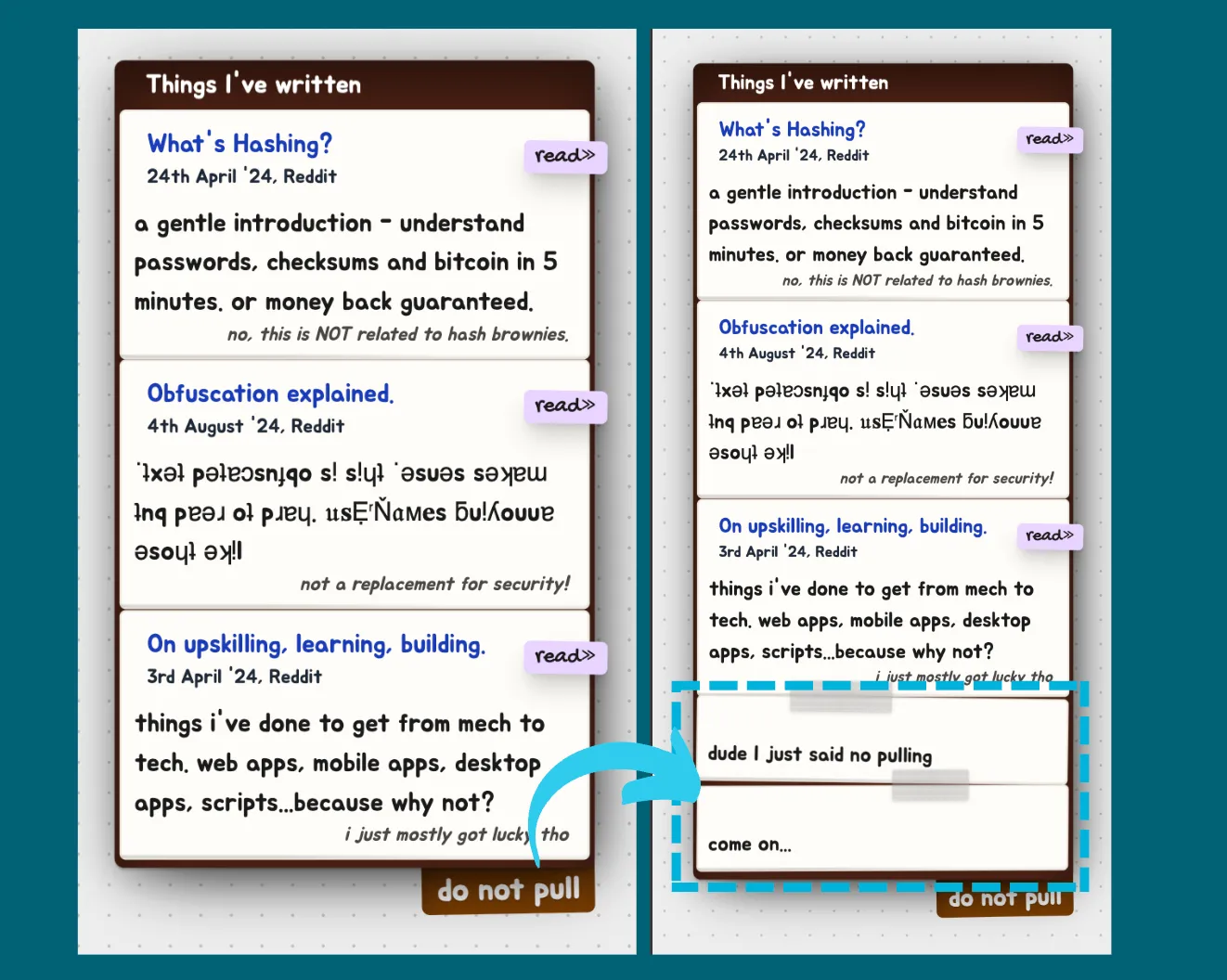
It looks something like this:
<div id="preview">
  <div id="entries">
    <div class="entry">Entry 1</div>
    <div class="entry">Entry 2</div>
    <div class="entry">Entry 3</div>
  </div>
  <button id="add-entry">
    Click to view more entries!
  </button>
</div>

<style>
  #preview {
    background: brown;
  }
  .entry {
    background: wheat;
  }
</style>

<script>
  // We want to add a new entry on click
  document.getElementById("add-entry").addEventListener("click", (e) => {
    // Create a new div, add the class for styling and innerText
    const newEntry = document.createElement("div");
    newEntry.className = "entry";
    newEntry.innerText = "new entry here bakayaru konoyaru";

    // Append it to our entries
    const entriesDiv = document.getElementById("entries")
    entriesDiv.appendChild(newEntry);
  })
</script>
But the style doesn’t work even though we’ve added the CSS class entry to our div!
This is because Astro by default scopes CSS to within the file so it does not interfere with other styles. When we add a new HTML element div via Javascript dynamically, it’s not considered part of the scope of the current page.
Technically, Astro appends unique identifiers to CSS selectors to avoid them messing with the scope. ie., .entry is converted into something like .entry-unique_suffix during build time.
So our generated div has the class .entry but the styles have been converted to .entry-unique_suffix, which is why no style matches .entry and it isn’t applied.
The solution - :global()
Astro has a modifier :global() which allows us to specify that a style needs to be applied across contexts.
.entry {
  /* Breaks. Scoped, applies only to the current page */
  background: wheat;
}

:global(.entry) {
  /* Works! This is unscoped and applies to all ".entry" everywhere! */
  /* Wait...did we say EVERYWHERE?! */
  background: wheat;
}
But - you’ll notice that :global() means it applies to all usages, everywhere - all your entrys across ALL your files are going to look wheatish!
We don’t want that. We want it to apply only to this specific page.
Here’s the final solution, a combination of both scoped and unscoped:
Scope it to the parent and then apply unscoped.
#preview :global(.entry) {
  /* #preview is scoped, ensuring it matches the #preview in this page first */
  /* inside that scoped container, it matches all .entry classes */
  background: wheat;
}
There we have it! Bending Astro’s CSS scope to our (reasonable) will :)


